
Enter it once.
Up to date everywhere.
Booking, artists, technical, staff, transport, content, tasks (DoitOnce) and security all work from the same data — no Excel chaos, no double entry, no conflicting lists.
Already a customer? Sign in
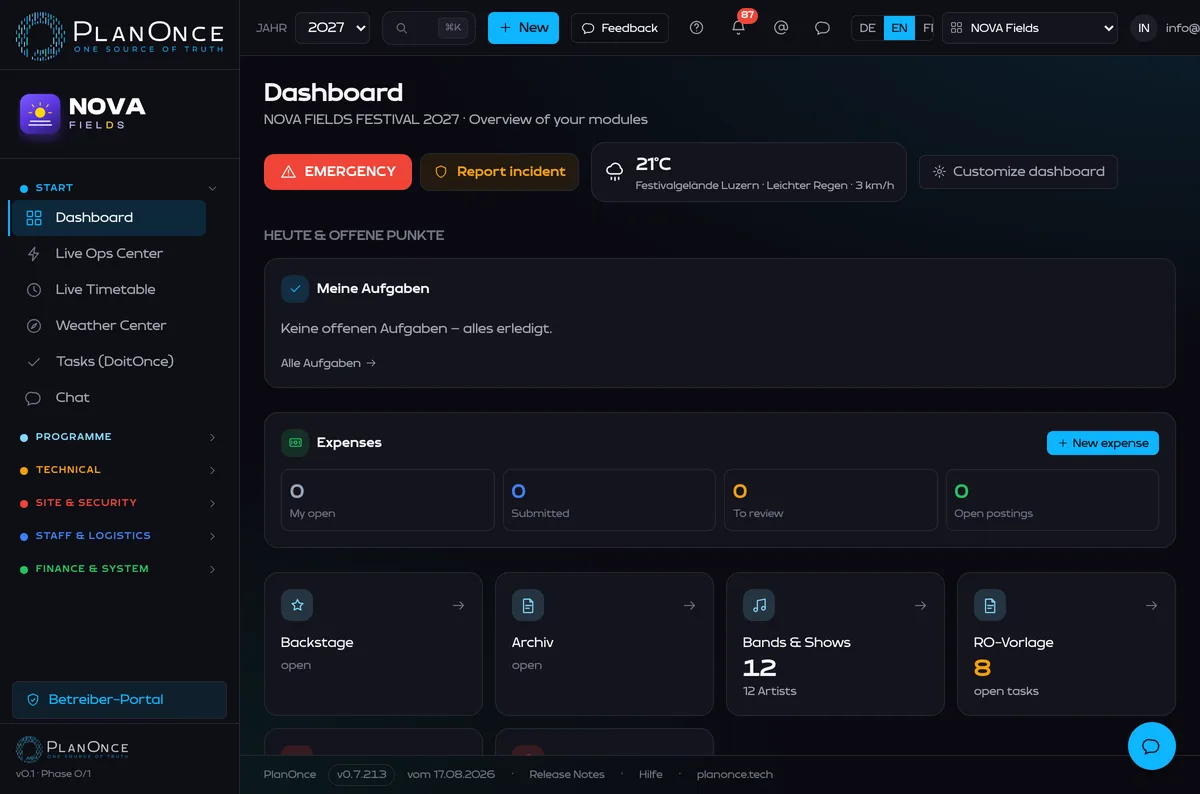
One platform
All modules in one place instead of fifteen files — on the desktop and as an installable app on your phone.
One set of data
Information is entered once and then used, always up to date, everywhere.
Role-based access
Everyone sees only the organisations and data they're authorised for.
Connected across the festival
One change automatically updates every process that depends on it.
Real views, no mockups.
From the dashboard to the band portal — this is PlanOnce in day-to-day operation.
One change.
Every relevant area is up to date.
When a show time moves, the new time doesn't travel through five spreadsheets and three phone calls — it's already wherever anyone needs it.
The whole production, one system
Every module works on its own — and automatically feeds the others.
Artists & Booking
From first enquiry to sign-off — artist relations end to end.
- Enquiries, contacts & contracts
- Riders, documents & approvals
- One band portal: rider, request basic backline, transport, accommodation & media approval
- SUISA work list per show with Excel/PDF export
- Band roadmap in the approval portal: schedule, arrival/departure, travelling party, accommodation & guest tickets — automatic, plus a roadmap PDF
- Create a show directly — even without the booking module (small plans)
Technical & Advancing
Technical requirements structured, not buried in PDF attachments.
- Rider review, recap & additional quotes
- Backline from the master inventory — assignable per supplier; the assigned supplier maintains their own line items including unit/daily price in the portal, and bands request the venue's basic backline in the portal
- Base equipment per location from supplier master lists (Excel import) — prices & account mapping only in Technical Production
- Supplier quotes with line items & versions — review & approval in the responsible department
- Annotate riders straight in the PDF, orders & approvals
Staff & Shifts
Plan the crew, see the costs — all on the same page.
- Crew & shift planning with a completeness check
- Volunteer shifts (paid or Goldies) with a public sign-up portal — Event Production requests them, confirmation in the Staff module
- Volunteer applications via the sign-up link: review, accept and assign straight to open shifts
- Working hours, surcharges & freelancers (invoice)
- Companies (= suppliers): assign people – master data in the Suppliers module & personal approval links
- Accommodation, expenses & costs
Transport & Logistics
Arrivals, shuttles and deliveries with live status.
- Flights & transfers
- Vehicles & drivers
- Shuttles, deliveries & status
- Ticketing: allocations, guest lists, check-in & external sources (TicketCorner)
Content & Media
Photos and videos that file themselves.
- Manage media
- Auto-tagging by artist, date & venue
- Approval right in the band portal & press portal
Access & Security
Who's allowed where — cleanly controlled.
- Accreditations & badge types with location access
- Public request portal with photo + approval, day/guest passes
- QR check-in at the gate: traffic-light status + live attendance
- Roles & access zones
- Site & crowd map: capacity zones (crowd density), escape & fire-service routes, one-way/wayfinding, bottlenecks & closures — clicking a location opens its zone plan
- Lost/stolen report blocks the pass instantly; replacement badge with a new QR code, the old one stays blocked
- Authority permit dossier as a PDF, generated automatically from festival data
- Live Operations Center: an aggregated control room with status lights per location, live tiles (safety, crew, incidents, weather, capacity) and a change feed of the last 30 minutes
Budget & Finance
From plan to close — including chart of accounts & expenses.
- Budget: planned/actual/forecast & approvals
- Chart of accounts: accounts, LE1–4, close & reclassifications
- Booking fees & backline costs per account — automatically
- Expenses: photograph/upload the receipt, Swiss VAT automatic, approval workflow, account coding & posting-journal export (CSV/Excel/PDF/DATEV) + receipts ZIP
- Reports: an analytics dashboard plus your own custom reports — freely choose source, columns, filters & sorting, shareable as a public link (export Excel/PDF/CSV)
Production & Location
Production management per stage and location — with a festival control room and emergency button.
- Stage & location manager with live timetable & entry stop
- Zone plan per location (PDF/image import, shapes)
- Technical area per location: base equipment from supplier master lists (audio/lighting/infrastructure)
- Workstations & meeting rooms for the crew — meeting rooms linked directly to a Google Calendar (occupancy & booking at a glance)
- Daily reports, incident logging & EMERGENCY button
- Cleaning schedule & hour tracking with payout
- Per-location ops tools: readiness/sign-off status, opening/closing checklists, operational issues & shift handover
- Crowd management: a capacity light per location from operating capacity, occupancy, warning threshold & entry stop
- Decision log: a chronicle of operational decisions (who, when, what, why) — solid for the authorities' debrief
- Event comms: operational messages to crew, security, info screens & app — with templates (location full, severe weather, evacuation, missing person)
- Surroundings register: lost & found, damage reports, authority contacts, service providers, traffic & visitor logistics and permit-condition checkpoints
Infrastructure & Ops
Power, network, materials and fleet on the site map.
- Power: distributors & consumers, load per phase (L1/L2/L3) with imbalance & reserve, a bidirectional supply chain, inspection/sign-off & fault analysis — on the distribution-network map, with PDF export
- Network & ICT: VLANs, IPAM (subnets & IPs), Wi-Fi access points with coverage, SSID management, fibre & redundancy
- Materials & pallet boxes with QR code & printable label
- Weather action plan: threshold rules (wind/gusts, thunderstorm, heat, heavy rain) trigger the assigned measure; severe-weather alert as a pop-up in Live Ops & Security
- Fleet, accommodation & WhatsApp broadcasts to the team
Sponsors, Vouchers & Campaigns
Commerce, catering and communication around the festival.
- Sponsor management: packages, pipeline (lead to paid), values & deliverables — with logo upload, partner PDF and a public sponsor wall
- Meal vouchers: QR tickets per person, day and meal — also generated automatically from shift catering, with voucher value into the budget, printed as an A4 sheet and redeemed at the stand with a scanner
- Email campaigns: recipients from crew, sponsors or suppliers, placeholders, test mail and batch sending over SMTP
Tasks – DoitOnce
Integrated task management across every module.
- Tasks with due date, priority, assignment & checklists
- Views: list, board (Kanban), calendar & dashboard
- Straight from Booking, Bands, Staff & co. — linked to the record
- Visibility per task: private, team, project or public
- Team lists: team → groups (topics) → tasks, every member contributes
- Comments, mentions & activity history
PlanOnce for every team
Every role sees its own value at once — pick one.
Festival management sees at a glance:
- Overall status of every area
- Open tasks
- Risks & warnings
- Budget overview
- Latest changes
Artist Relations sees at a glance:
- Artist enquiries
- Contracts & documents
- Travel & accommodation
- Contacts & approvals
Production sees at a glance:
- Technical riders
- Backline
- Soundchecks
- Frequencies
- Open technical requirements
Crew planning sees at a glance:
- Shifts
- Working hours
- Staff costs
- Accommodation
- Availability
Transport team sees at a glance:
- Flights & transfers
- Vehicles & drivers
- Shuttles & deliveries
- Live status
Content team sees at a glance:
- New uploads
- Automatic artist tags
- Pending approvals
- Approved media
- Press & artist portals
Security sees at a glance:
- Accreditations
- Access zones
- Roles & permissions
- Security reports
- Festival control room: status per location
- Live tiles: safety, crew, incidents, weather, capacity
- Crowd management & entry stop
- Event comms: evacuation, missing person
- Decision log & authority contacts
Stage Manager sees at a glance:
- Only their own stage(s)
- Live timetable & “My Day” filter
- Schedule from load-in to curfew
- Tech, backline & contacts
- The band's travelling party
Location Manager sees at a glance:
- Only their own location
- “My Day”: the day's schedule
- Documents, setup/teardown & safety info
- Daily report at the end of the shift
- EMERGENCY button & emergency contacts
- Location readiness & sign-off status
- Opening & closing checklist per day
- Operational issues & shift handover
A look inside the application
No stock dashboard. This is PlanOnce.
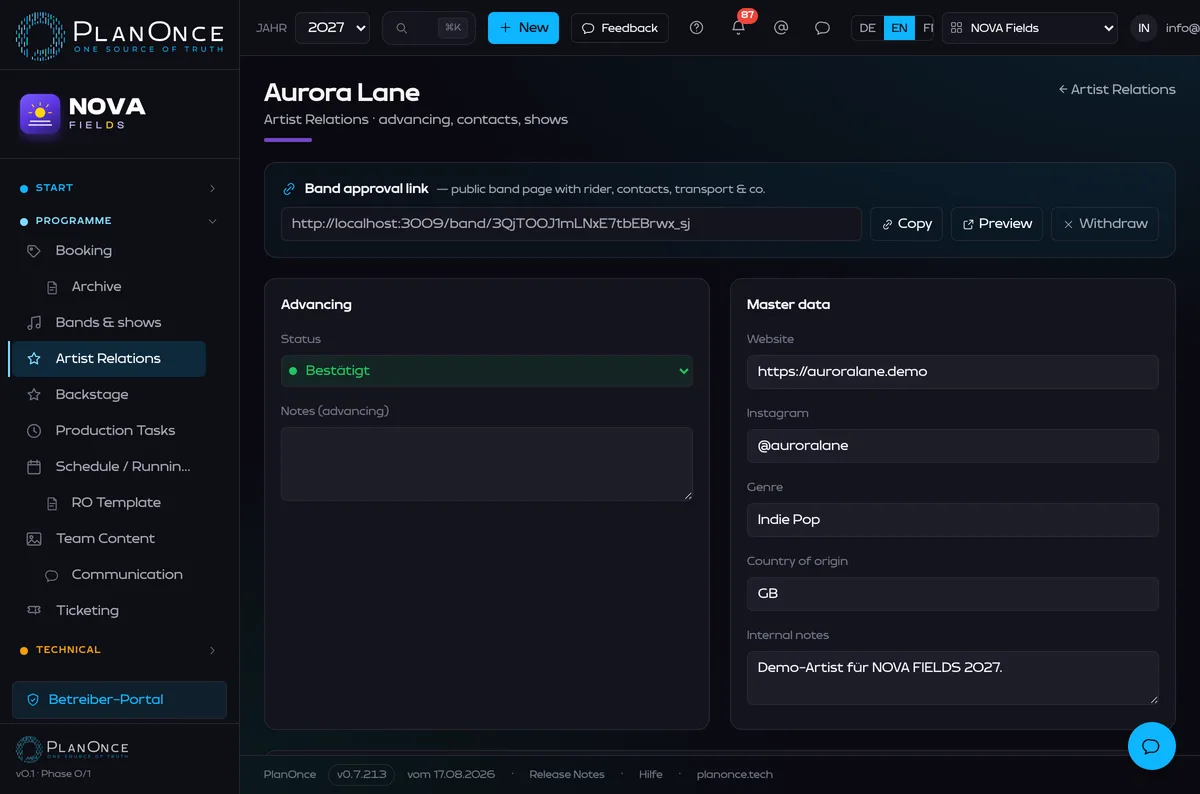
Everything about a band in one place
Overview, booking, contacts, travel, accommodation, tech, content and documents — without jumping between five files.
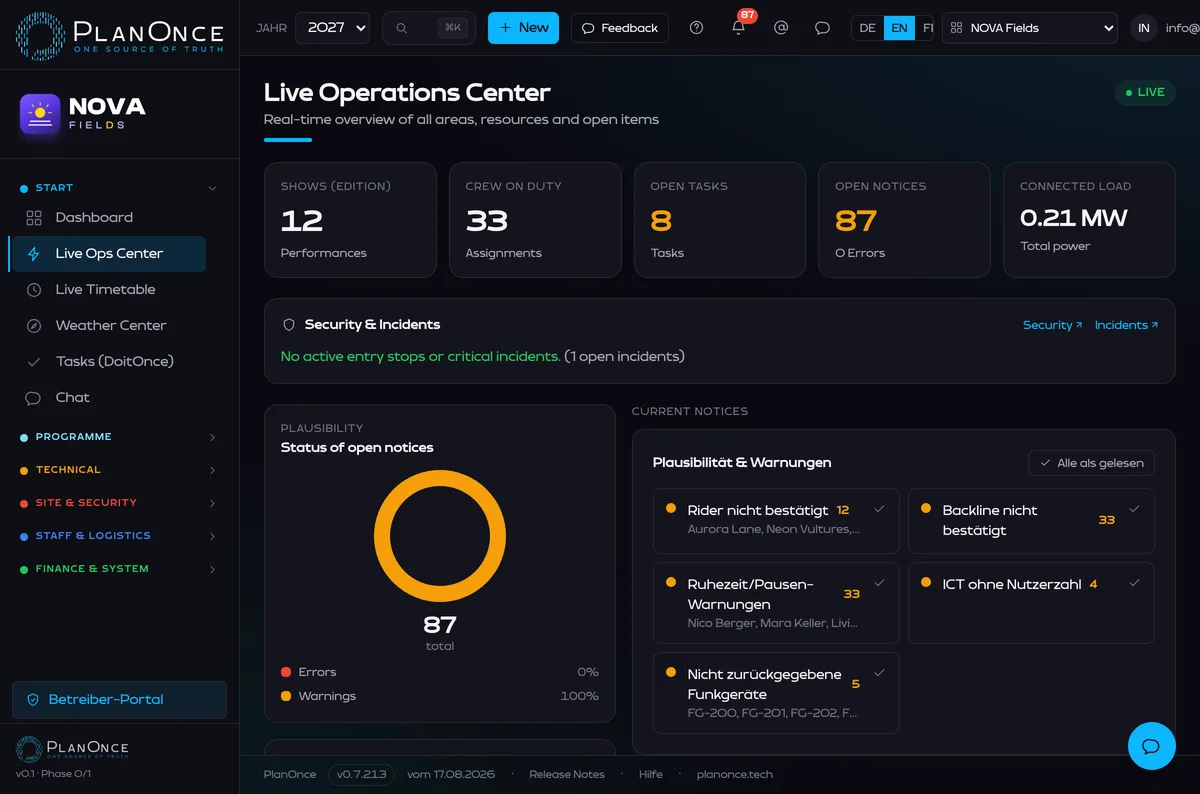
One control room for the whole festival
One aggregated control room across every module: a status light per location (ready / issue / closed), live tiles for safety, crew, incidents, weather and capacity — plus a feed that answers what changed in the last 30 minutes.
Built for real festival operations.
Not for theoretical processes.
Born in the field of real festival production — today a standalone product for any event.
“Before, the information lived in fifteen Excel files. With PlanOnce our teams all work from the same source — a change is instantly up to date everywhere. In day-to-day production that saves us hours every day.”
Productive in three steps
Bring your existing data
Excel lists, artist data, contacts and schedules are imported — you don't start from scratch.
Configure your organisation
Modules, roles, permissions, venues and projects are set up to fit you.
Start together
The core team is onboarded first, then the roll-out extends to further teams, partners and service providers.
Every organisation works fully separately in its own protected space.
Security & data protection
Separate tenants, clear permissions, traceable changes.
Separate organisations
Each tenant is separated from the others logically and technically.
Role-based permissions
Permissions down to field level, per organisation.
Change history
Traceable: who changed what and when.
Backups & export
Regular backups, data exportable at any time.
Controlled sharing
External parties see only explicitly shared content.
GDPR-oriented
Encrypted transmission, deletion at contract end. [Certifications being clarified.]
Passwordless sign-in
Sign in with a passkey (Face ID, Touch ID, Windows Hello), an authenticator app with recovery codes, or approve it right on your device.
Plans by festival size
Per organisation, cancellable yearly. Prices on request.
Event Pass
For a one-off event — one festival year, no subscription.
- Booking & Programme
- Artists & Advancing
- Production Tasks & Gantt
- Technical Production
- Staff & Crew
- Documents
- Live Ops & Backstage
- FestivalShop / Orders
- Location Manager & Cleaning
- Access, Security & Site Map
- Team Content, Transport & Accommodation
- Import of existing data
- Budget & Chart of Accounts
- Expenses / Expense Management
- Fleet
- White-label: your own WhatsApp/email sender
Core
Small festivals & teams — including document storage and an internal ordering shop (FestivalShop).
- Booking & Programme
- Artists & Advancing
- Production Tasks & Gantt
- Technical Production
- Staff & Crew
- Documents
- Live Ops & Backstage
- FestivalShop / Orders
- Location Manager & Cleaning
- Access, Security & Site Map
- Team Content, Transport & Accommodation
- Import of existing data
- Budget & Chart of Accounts
- Expenses / Expense Management
- Fleet
- White-label: your own WhatsApp/email sender
Festival
Professional festivals: all core modules, Live Ops, Location Manager & more.
- Booking & Programme
- Artists & Advancing
- Production Tasks & Gantt
- Technical Production
- Staff & Crew
- Documents
- Live Ops & Backstage
- FestivalShop / Orders
- Location Manager & Cleaning
- Access, Security & Site Map
- Team Content, Transport & Accommodation
- Import of existing data
- Budget & Chart of Accounts
- Expenses / Expense Management
- Fleet
- White-label: your own WhatsApp/email sender
Operations
All modules — including Budget & chart of accounts.
- Booking & Programme
- Artists & Advancing
- Production Tasks & Gantt
- Technical Production
- Staff & Crew
- Documents
- Live Ops & Backstage
- FestivalShop / Orders
- Location Manager & Cleaning
- Access, Security & Site Map
- Team Content, Transport & Accommodation
- Import of existing data
- Budget & Chart of Accounts
- Expenses / Expense Management
- Fleet
- White-label: your own WhatsApp/email sender
Enterprise
Multiple festivals or organisations — with custom modules and integration of existing databases.
- Booking & Programme
- Artists & Advancing
- Production Tasks & Gantt
- Technical Production
- Staff & Crew
- Documents
- Live Ops & Backstage
- FestivalShop / Orders
- Location Manager & Cleaning
- Access, Security & Site Map
- Team Content, Transport & Accommodation
- Import of existing data
- Budget & Chart of Accounts
- Expenses / Expense Management
- Fleet
- White-label: your own WhatsApp/email sender
- Custom modules & integration of existing databases
Frequently asked questions
Can existing Excel files be imported?
Yes. Artist data, contacts, schedules and other lists can be imported during onboarding — you don't start from scratch.
Can individual modules be used separately?
Yes. You start with the areas you need and switch on further modules later.
Is data from different organisations fully separated?
Yes. Each organisation works in its own protected space. No customer sees another's projects or data.
Does PlanOnce work on smartphone and tablet?
Yes. The interface is reworked mobile-first — on small screens, lists are shown as cards, not just shrunk.
Can artists add their own information?
Yes. Through a single band portal, bands see their rider, add travel & transport details, request accommodation and approve their media — without access to the rest of the app.
Can external service providers get restricted access?
Yes. Roles and permissions control who sees and edits what, down to field level.
Are there PDF and Excel exports?
Yes. Key lists and reports can be exported, including a credit list in the content area.
Can several festival years be managed?
Yes. Editions sit side by side, kept separate; templates can be carried over from year to year.
Can PlanOnce be adapted to our processes?
Status lists, roles, categories and review steps are configurable. Custom adaptations are available for Enterprise.
How does onboarding work?
In three steps: bring over your data, configure the organisation, onboard the team. The core team starts first, then a gradual roll-out.
Where is the data stored?
Hosted in the EU/Switzerland. [HOSTING LOCATION is confirmed as binding before contract signature.]
How are roles and permissions managed?
Per organisation. Administrators assign roles that control module visibility and edit rights down to individual fields.
Ready for less Excel and more overview?
Get started free right away — or write to us if you have questions about the right setup or importing existing data.
- Ready to go immediately
- No obligation
- Personal support
- Import of existing data possible
Prefer to reach us directly? info@planonce.ch